ACS Engineering Study Planner
Phase 1 Study Planner is a lightweight student tool designed to help learners catch up with recorded ACS Engineering classes before Phase 2 begins. It automatically calculates daily study loads based on enrollment date and generates a personalized routine so students stay on track.

Project Overview
Engineering Study Plan is a comprehensive web application designed for the ACS Group EdTech platform, supporting HSC and admission prep to help students plan and track their engineering course progress. It provides an intuitive interface for managing classes, tracking completion status, and maintaining a personalized study schedule.
Project Brief Details
Engineering Study Plan is a -stack application that helps engineering students:
Register and create personalized study plans
Track their daily classes and completion progress
Manage their course schedule based on their HSC batch year
Visualize their study progress and plan completion
Store and retrieve all data securely through a cloud-based database
The application combines modern web technologies with a reliable backend to provide students with a seamless experience in managing their engineering education journey.
Target Users
This application is particularly aimed at two groups: Phase 1 defaulters—students who missed classes during the initial phase and need a personalized catch-up routine—and those who require accelerated study plans to finish phase 1 before phase 2 begins, helping them stay on schedule.
How the Site Works
User Flow
Course Email Validation: User lands on the site and enters their course-provided email for validation.
Plan Setup: Users select their study plan’s start and end dates, and the system automatically suggests a suitable completion rate or end date to help them stay on track with an optimal schedule.
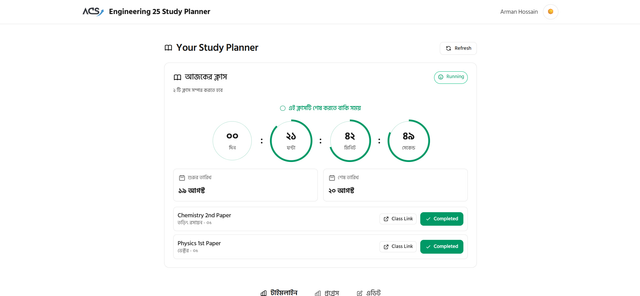
Personalized Dashboard Generation: Users instantly receive a personalized dashboard with built-in tools to mark classes as done and add notes for each entry.
Key Features
User Authentication: Email-based registration and identification
Study Plan Initialization: Automatic setup based on HSC batch and college
Real-time Progress Tracking: Live updates on class completion
Class Resources: Each class provides direct hyperlinks to the class link and class PDF, making resources easily accessible from the dashboard.
Responsive Design: Works seamlessly on desktop and mobile devices
Dark Mode Support: Theme toggle for comfortable viewing in any lighting condition